
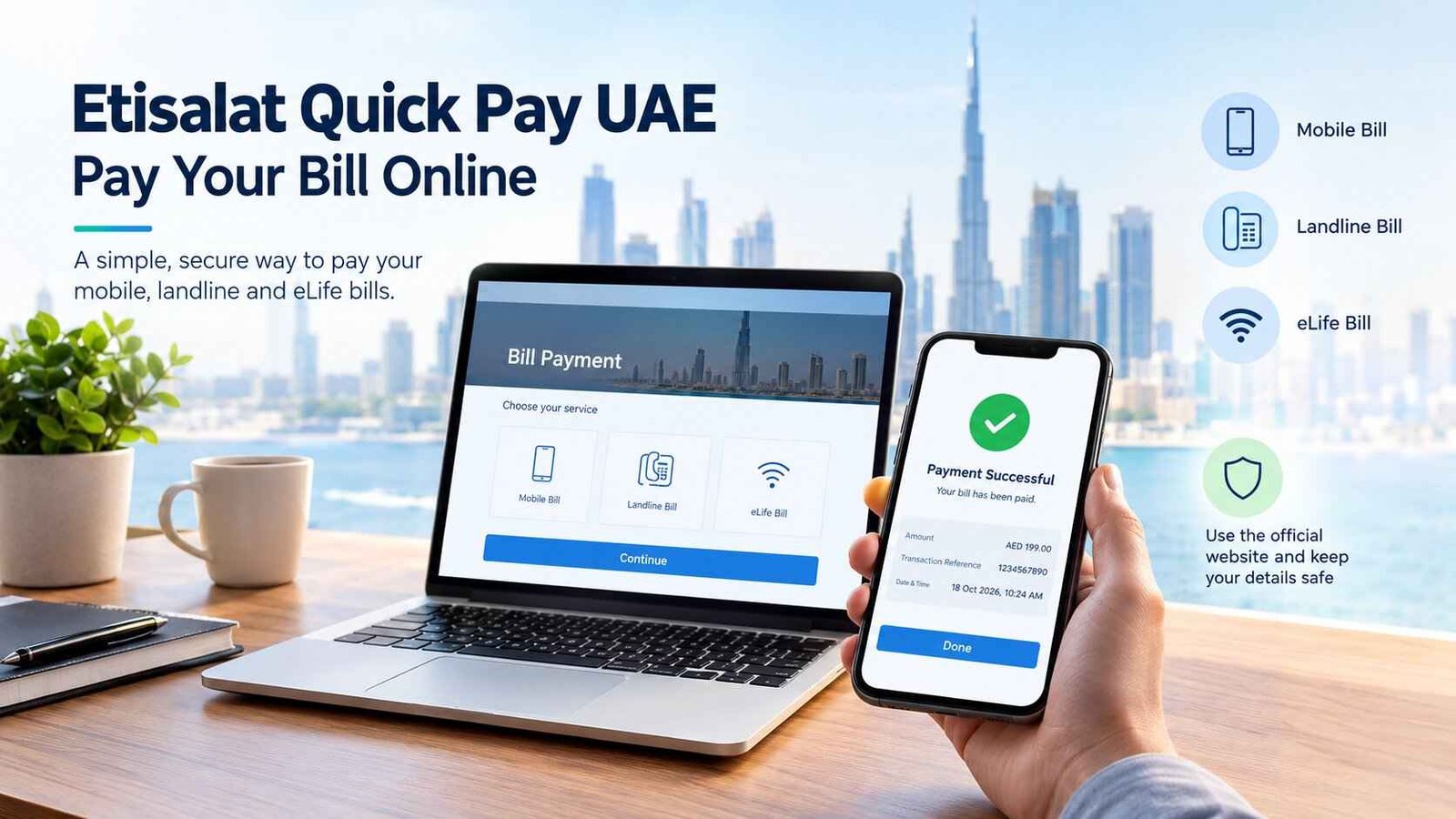
Etisalat Quick Pay UAE: Pay Your Bill Online
If your Etisalat bill is due and you do not want to spend time signing in, Etisalat Quick Pay lets customers in the UAE pay eligible bills online through the official e& website. The service supports mobile, landline and eLife bill payments using a credit or debit card. The official starting point is e& Quick Pay.
Before making a payment, check whether you need to settle a monthly bill or recharge a prepaid mobile number. These are different transactions, and choosing the wrong one can cause unnecessary delays when you are trying to restore your balance or clear a bill.
Safety Note
Use the official e& UAE Quick Pay page rather than an unfamiliar website appearing in search results or a payment link sent by a stranger. Check the address carefully before entering card details or an OTP. Payment procedures and limits can change, so verify the current information on the official website. Last checked: 18 October 2026. EmaratSmart.com is an independent informational website, not an official e& or government website; this guide is general information, and the provider’s instructions take precedence.
What Is Etisalat Quick Pay?
Etisalat Quick Pay is an online payment option from e& UAE that allows customers to pay eligible telecommunications bills without needing to manage everything through a signed-in account. The official payment information covers mobile, landline and eLife bills.
The service is useful if you need to pay a household internet bill, settle a mobile account, or make a payment for an eligible account without opening the full account dashboard.
The official service page is available here: Etisalat Quick Pay UAE.
What can you pay through Quick Pay?
According to e& UAE’s official payment guidance, Quick Pay supports these bill categories:
- Mobile bills
- Landline bills
- eLife bills
The options displayed can depend on the account and the payment flow. If you need to recharge a prepaid mobile number rather than settle a bill, use the provider’s dedicated recharge option and confirm the number before completing the transaction.
How to Use Etisalat Quick Pay in the UAE
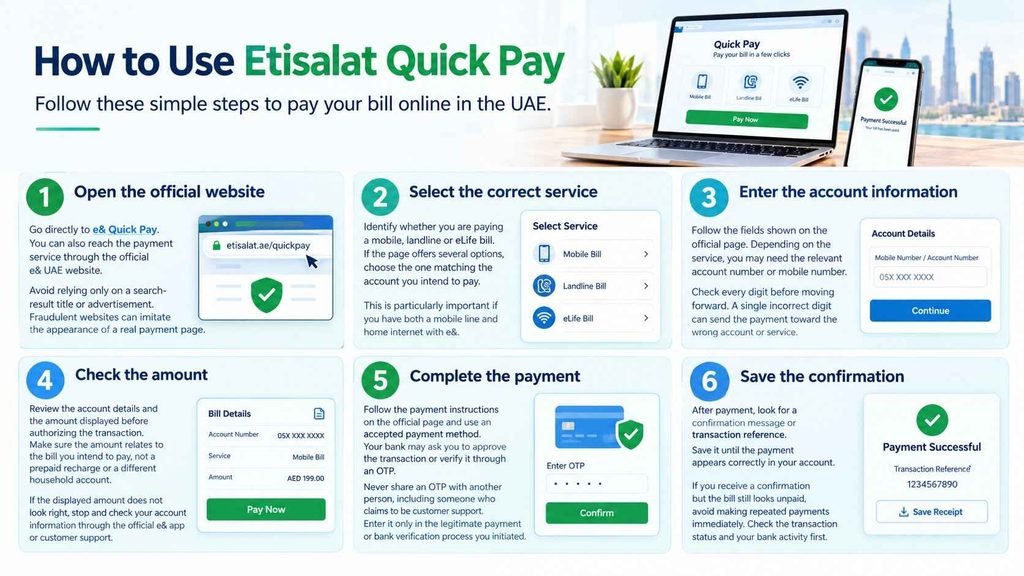
The exact labels on the payment page can change, but the general process is straightforward. Start from the official e& website, select the relevant payment service, enter the requested account details, and verify the amount before authorizing payment.
Step 1: Open the official website
Go directly to e& Quick Pay. You can also reach the payment service through the official e& UAE website.
Avoid relying only on a search-result title or advertisement. Fraudulent websites can imitate the appearance of a real payment page.
Step 2: Select the correct service
Identify whether you are paying a mobile, landline or eLife bill. If the page offers several options, choose the one matching the account you intend to pay.
This is particularly important if you have both a mobile line and home internet with e&.
Step 3: Enter the account information
Follow the fields shown on the official page. Depending on the service, you may need the relevant account number or mobile number.
Check every digit before moving forward. A single incorrect digit can send the payment toward the wrong account or service.
Step 4: Check the amount
Review the account details and the amount displayed before authorizing the transaction. Make sure the amount relates to the bill you intend to pay, not a prepaid recharge or a different household account.
If the displayed amount does not look right, stop and check your account information through the official e& app or customer support.
Step 5: Complete the payment
Follow the payment instructions on the official page and use an accepted payment method. Your bank may ask you to approve the transaction or verify it through an OTP.
Never share an OTP with another person, including someone who claims to be customer support. Enter it only in the legitimate payment or bank verification process you initiated.
Step 6: Save the confirmation
After payment, look for a confirmation message or transaction reference. Save it until the payment appears correctly in your account.
If you receive a confirmation but the bill still looks unpaid, avoid making repeated payments immediately. Check the transaction status and your bank activity first.
Is Etisalat Quick Pay Free?
The official Quick Pay information confirms that online bill payment is available, but the pages reviewed do not establish a universal additional fee for every account, card and transaction. Do not assume that every payment method has identical charges.
Before authorizing payment, review the final amount displayed on the payment page and any fee information shown by your bank or payment provider. If a fee appears that you do not understand, check the official terms or contact the provider before proceeding.
The amount due may also differ from the previous month’s bill if new usage, adjustments or other charges have been added. Check the current bill rather than relying on an old screenshot or saved amount.
Can You Use Quick Pay Without Logging In?
Quick Pay is designed to make bill payment more convenient, and e& describes its online Quick Pay option as a way to pay eligible bills. The available steps and account information requirements can depend on the payment flow.
If the site asks you for additional information, follow the instructions on the official page. Do not use a third-party website that promises to bypass the provider’s normal checks.
If you already use the e& UAE app, you can also view account details and pay your bill there. The app is useful when you need to compare the current amount with your billing history before paying.
Etisalat Quick Pay vs. Prepaid Recharge
A bill payment and a prepaid recharge are not interchangeable. A bill payment settles an amount due on an eligible account. A recharge adds credit or value to a prepaid mobile account.
| Your situation | What to choose |
|---|---|
| You have a monthly postpaid mobile bill | Bill payment |
| You need to pay your home eLife bill | Bill payment |
| You need to settle a landline bill | Bill payment |
| You use a prepaid mobile line and need more credit | Prepaid recharge |
| You are unsure which account is being charged | Check the account details before proceeding |
e& UAE lists online Quick Pay for bills and provides a separate online recharge route for prepaid customers. Start from the official e& UAE website and select the relevant service.
Practical tip: Before paying, read the account or service description shown on the confirmation screen. This is particularly useful if your household has multiple e& products or you are helping another person pay.
Other Ways to Pay an Etisalat Bill
Quick Pay is not the only payment option. e& UAE lists several alternatives for customers who prefer an app, telephone service, bank channel or in-person payment.
e& UAE app
The official app lets customers access account information and view and pay bills. It may be the more convenient choice if you need to inspect your bill before paying or manage multiple linked services.
Use the app information and download links provided by the official e& UAE website.
Phone payment
The official e& payment guidance lists automated payment services through 101 or 125. It instructs customers to select the bill-payment option and follow the prompts.
Check the current official instructions before calling, particularly if you are outside the UAE or using a service that may have different access requirements.
Bank channels
e& states that customers can pay bills through participating banks’ channels, including online banking, mobile banking, phone banking and ATMs where supported.
The steps and availability depend on the bank. Check the payee name carefully and verify the account or reference information before confirming.
e& payment machines
e& payment machines are available at its stores and selected locations. The official provider page says these machines can accept cash or credit card payments.
If you prefer not to enter card details on a website, an official payment machine or staffed service channel may be worth considering.
Exchange houses
e& lists exchange-house partners that offer bill-payment services. Availability may vary by location and service, so check with the exchange house before travelling.
For the latest options, refer to e& UAE’s official bill-payment methods.
What If Etisalat Quick Pay Is Not Working?
A payment page may fail to load, reject a card or display an error. The right response depends on whether the problem happened before you authorized payment or after your bank showed a debit.
The Quick Pay page will not open
First, check that you typed the official address correctly. Try opening the official e& website and reaching Quick Pay from there. You can also try a different browser or switch between Wi-Fi and mobile data.
If the official page itself appears unavailable, use another payment method listed by e& rather than entering card details into an unofficial alternative.
Your card is declined
A declined transaction does not always mean there is a problem with your e& account. Your bank may have blocked the transaction, the card may not support that type of payment, or additional verification may be required.
Check the message displayed by the payment page and your banking app. If the reason is unclear, contact your bank using the number or support channel printed on its official website or card.
Do not assume that a foreign-issued card will be accepted just because it works on other websites. Card acceptance can vary, and the payment page’s current instructions should be treated as authoritative.
Money was deducted but the bill is still unpaid
This situation needs care because making another payment too quickly could result in a duplicate transaction.
- Check whether your bank shows the transaction as pending or completed.
- Save the transaction reference, date and amount.
- Check the bill status again through the official e& app or website.
- If the payment remains unclear, contact e& support and provide the reference.
- Contact your bank if the transaction appears completed but the provider cannot locate it.
A bank notification alone may not confirm that the bill has been allocated to the intended account. Verify the account status before deciding whether another payment is necessary.
You paid the wrong account
Contact e& support promptly and explain what happened. Keep the transaction reference and details of the intended account available.
Do not assume that a payment can be reversed immediately. The next steps depend on the transaction status and the provider’s review. If necessary, ask your bank about its process for disputing or investigating the payment.
You did not receive a confirmation message
Check the payment page for a transaction reference and review your bank’s transaction history. Then check the bill status through an official e& channel.
If neither source makes the result clear, contact support before repeating the payment. A missing SMS does not, by itself, prove that a payment failed.
How to Avoid Fake Etisalat Quick Pay Websites
Payment scams can imitate familiar brands. A Reddit user reported encountering a fake website resembling the Etisalat bill-payment page after searching for Quick Pay. That report is a useful warning about verifying the address, although individual reports do not establish how common the scam is.
Use these precautions:
- Type the official address: Start from etisalat.ae/quickpay or the main e& UAE website.
- Check the domain: Do not trust a page just because its logo and colours look familiar.
- Avoid unsolicited payment links: If someone sends you a payment link unexpectedly, open the official website separately.
- Keep OTPs private: Enter a bank verification code only in the legitimate transaction you initiated.
- Check the amount and account: Make sure the service and amount match your intention.
- Save the reference: Keep proof of payment until the account reflects the transaction.
Be especially careful with search advertisements and messages that claim your line will be disconnected unless you pay immediately through a supplied link. Verify any urgent warning directly with e&.
How Long Does an Etisalat Quick Pay Transaction Take?
The official pages describe Quick Pay as a convenient online payment service, but the sources reviewed do not provide one guaranteed processing time that applies to every bank, account and transaction.
Some payments may show confirmation quickly, while others may need additional processing or investigation. Your bank’s authorization status and the account’s updated balance are two different pieces of information.
If you need proof that you paid, keep the transaction reference and check the account status. If the service remains unpaid after the transaction appears completed, ask e& to trace the payment rather than relying on an assumed processing time.
Can You Pay Someone Else’s Etisalat Bill?
e& support documentation describes a facility for checking payable amounts and making payments for other people’s accounts. The details visible to the payer may be limited, and the process can differ from managing your own account.
If you are helping a family member or another person, confirm the correct account details with them before submitting payment. Check the account identifier and amount on the final screen, and keep the receipt so both parties can verify the transaction.
Do not ask another person to send you their banking password, card PIN or OTP. You should never need those credentials to help them understand the payment process.
Quick Checklist Before Paying
Before you submit an Etisalat Quick Pay transaction, check these points:
- You are using the official e& website.
- You selected the correct service: mobile, landline or eLife.
- The account details match the intended recipient.
- The displayed amount is correct.
- Your bank or card can authorize the transaction.
- You know how to find the confirmation or transaction reference.
- You will check the account status if the payment result is unclear.
These checks take only a short time and can help prevent the most frustrating mistakes: paying the wrong service, trusting a fake website, or accidentally repeating a payment.
People Also Ask
What is the official Etisalat Quick Pay link?
The official e& UAE payment guidance links to etisalat.ae/quickpay. Check the web address before entering account or card details, and use the official e& website if you need to locate the service again.
Can I pay my Etisalat bill online in the UAE?
Yes. e& UAE lists online Quick Pay for mobile, landline and eLife bills using a credit or debit card. Customers can also check the e& UAE app, bank channels and other official payment methods.
Can I recharge an Etisalat prepaid number through Quick Pay?
e& provides online prepaid recharge as well as bill payment. Since recharging a prepaid number differs from settling a monthly bill, choose the correct option and verify the mobile number and amount before confirming.
What should I do if my Etisalat payment fails?
Check the error message and your bank’s transaction status. If no payment was completed, try an official alternative or contact your bank. If money was deducted, save the reference and check with e& before attempting another payment.
Can I pay an Etisalat bill without using the app?
Yes. The provider lists online Quick Pay as an alternative to the app, as well as telephone, bank and in-person payment channels. The method available to you may depend on the account and the provider’s current instructions.
Is Etisalat Quick Pay safe?
The official e& payment page is the appropriate starting point for online payments. Safety also depends on verifying the domain, checking the account and amount, protecting your OTP, and avoiding links from unverified messages.
Conclusion
Etisalat Quick Pay is a convenient way to pay eligible mobile, landline and eLife bills online in the UAE. Start from the official e& website, select the correct service, verify the account and amount, and keep your transaction reference.
If the page fails or the payment result is unclear, check your bank and account status before paying again. Using official payment channels and verifying each transaction can help you avoid common mistakes and suspicious websites.