ATM Balance Check UAE: How to Check Your Balance
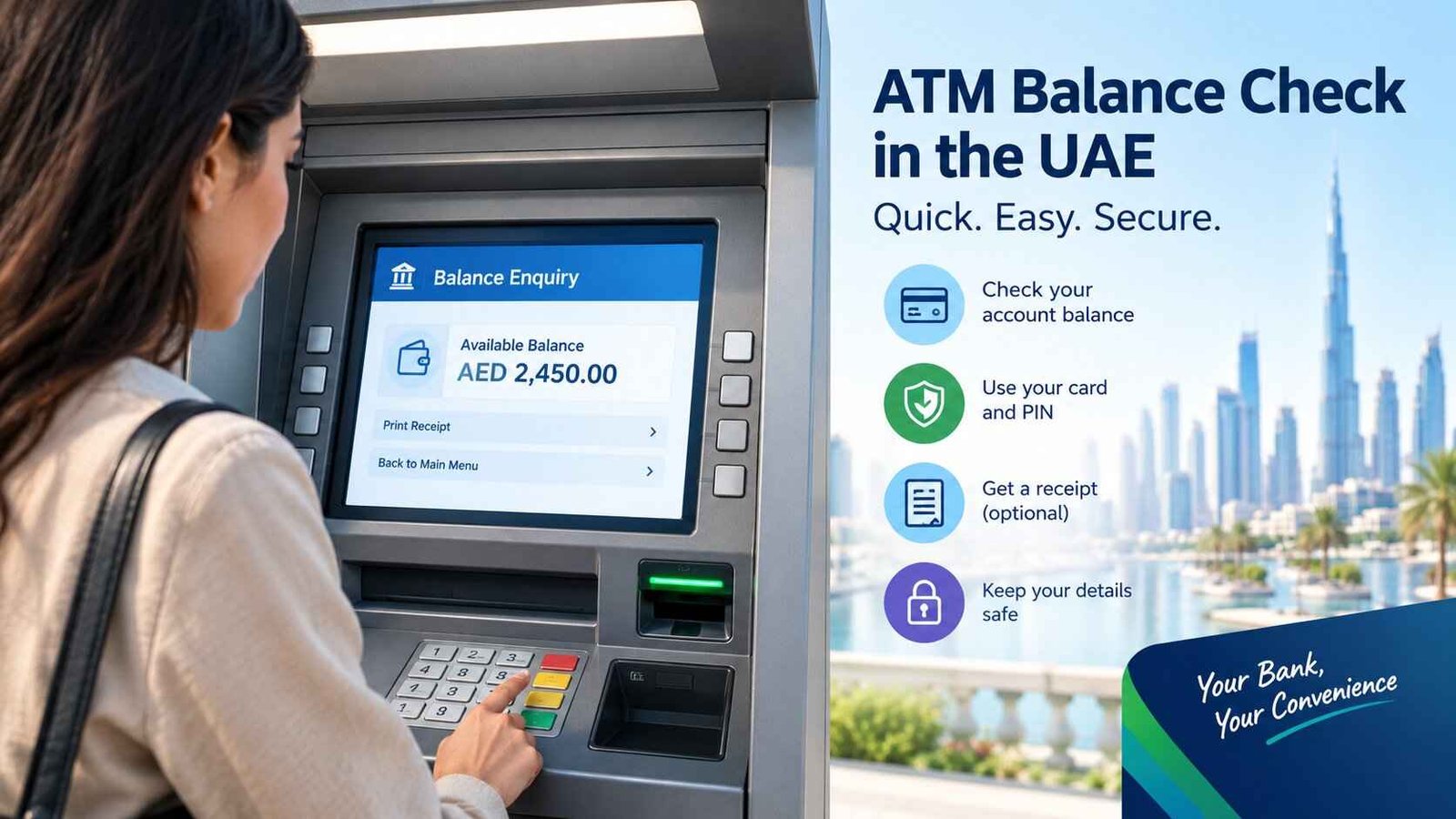
You are standing at an ATM in Dubai, Abu Dhabi or Sharjah, ready to withdraw cash, but you are not sure how much money is available in your account. You do not necessarily need to withdraw anything to find out. An ATM balance check in the UAE lets you view your bank or supported card balance by using the balance enquiry option on a compatible ATM.
The usual process is simple: use your bank card, enter your PIN privately and select Balance Enquiry, Balance Inquiry or a similar option. If you do not have your card with you, your bank’s official mobile app or online banking may provide another way to check.
The exact menu, available information and possible charges depend on your bank, card type and the ATM you use. Salary cards, such as FAB Ratibi, may also have a dedicated balance enquiry service.
Safety Note
When checking your ATM balance, cover the keypad while entering your PIN and never share your PIN, password or OTP with another person. Do not use a machine that appears damaged or has an unusual attachment around its card slot or keypad. Bank procedures and fees can change; verify them with your bank before using another bank’s ATM. Last checked: 26 October 2026. See the UAE Central Bank’s consumer-protection rules. EmaratSmart.com is an independent information website, not a bank or government entity; this guide is general information, not personal financial advice.
What Is an ATM Balance Check?
An ATM balance check is a banking service that lets you view the money recorded in an eligible bank account or card account without making a cash withdrawal. It is also called a balance enquiry or balance inquiry.
The information shown depends on the ATM and your card. You may see an available balance, an account balance or a choice between linked accounts. Some machines also offer a mini statement showing selected recent transactions.
United Arab Bank, for example, lists balance enquiry among its ATM services. HSBC UAE also explains that ATMs can be used to check a balance, although an ATM balance enquiry does not necessarily provide a complete transaction history.
Quick facts about ATM balance checks in the UAE
| Question | What you need to know |
|---|---|
| What do I need? | Usually a supported bank or card and its PIN |
| Which ATM should I use? | Your own bank’s ATM is a sensible first choice |
| Is it always free? | No universal fee rule applies to every bank and card |
| Can I check without withdrawing? | Yes, if the ATM supports balance enquiry for your card |
| Can I check without a smartphone? | Yes, a compatible ATM can work without a banking app |
| What if I have a salary card? | Follow the card issuer’s specific balance-check instructions |
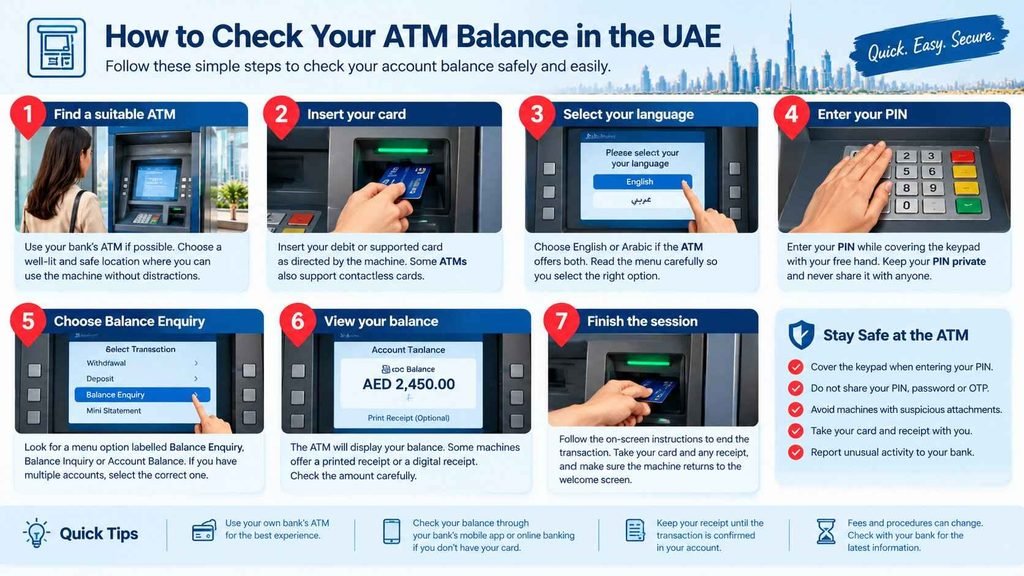
How to Check Your ATM Balance in the UAE
For most supported bank cards, the process takes only a few steps. The ATM screen may look different depending on the bank, but the basic method is similar.
Step 1: Find a suitable ATM
If possible, use an ATM operated by the bank that issued your card. You can usually find locations through the bank’s official website or app.
Choose a well-lit location where you can use the machine without being crowded or distracted. If the card reader or keypad looks unusual, choose another ATM and report your concern to the bank.
Step 2: Insert your card
Insert your debit or supported prepaid card as directed by the machine. Some ATMs also support contactless card access, but this depends on the machine and card.
Follow the screen instructions. Never force your card into a slot that appears damaged or blocked.
Step 3: Select your language
Choose English or Arabic if the ATM offers both. Read the menu carefully so you do not accidentally choose a cash withdrawal, transfer or other transaction.
Step 4: Enter your PIN privately
Enter your card PIN while covering the keypad with your free hand. Make sure people nearby cannot easily see the numbers.
Do not let a stranger take your card or offer to enter your PIN for you. Genuine bank employees do not need you to reveal your complete card PIN.
Step 5: Choose Balance Enquiry
Look for a menu option labelled Balance Enquiry, Balance Inquiry, Account Balance or similar wording.
If your card is linked to more than one eligible account, the ATM may ask you to select an account. Choose the correct one before continuing.
Step 6: View your balance
The ATM may display the balance on screen. Some machines offer a printed receipt, while others may provide a digital receipt or different options.
Check the amount carefully. If you need to keep a record, retain the receipt securely and avoid leaving it at the machine.
Step 7: Finish the session
Follow the on-screen instructions to end the transaction. Take your card and any receipt, and make sure the machine has returned to its welcome screen before walking away.
Can You Check Your Balance at Another Bank’s ATM?
You may be able to check your balance at another bank’s ATM, but availability and fees depend on your card issuer, the ATM operator and the transaction type. Do not assume every ATM supports balance enquiries for every card.
HSBC UAE specifically warns that some other banks’ ATMs may charge for balance enquiries. The safest approach is to check your bank’s current fee schedule before using another institution’s machine.
If you are unsure, use your own bank’s ATM or its official mobile app. This avoids relying on unverified claims that all UAE ATM balance checks are free.
Your own bank’s ATM versus another bank’s ATM
| Feature | Your bank’s ATM | Another bank’s ATM |
|---|---|---|
| Balance enquiry | Usually the best first option | Depends on card and ATM support |
| Possible fees | Check your bank’s current tariff | Check both applicable terms and on-screen disclosures |
| Account options | May offer more issuer-specific features | Menu and supported services may be more limited |
| Troubleshooting | Your bank is the direct point of contact | Your card issuer may need to investigate |
Before confirming any transaction, read the screen for a fee or warning. If you do not understand the charge, cancel the transaction and verify it with your bank.
Is ATM Balance Checking Free in the UAE?
There is no single fee that can safely be applied to every UAE bank, card and ATM. Some banks provide balance enquiry through their own ATMs at no charge, while another bank’s ATM or a particular card arrangement may have different conditions.
The amount, if any, should be confirmed through the official fee schedule or the bank’s customer-service channel. Do not rely on a general website that states a fixed AED charge without identifying the bank, card and current tariff.
If you only need to see your balance, compare the options available to you. Your bank’s mobile app or online banking may be convenient, provided you can access it securely. Remember that mobile data or other services can have their own costs, separate from a balance enquiry.
How to Check a Salary Card Balance in the UAE
A salary card is not always the same as a regular debit card connected to a current account. Some employers pay salaries through prepaid cards, so the balance-check process depends on the card issuer and the programme.
Before following instructions intended for a standard bank account, identify the provider named on your card.
FAB Ratibi salary card
First Abu Dhabi Bank (FAB) offers Ratibi, a prepaid salary card designed for eligible employees who receive wages without needing a traditional bank account. FAB provides a dedicated Ratibi Prepaid Card Balance Enquiry service for existing cardholders.
Start from the official FAB Ratibi page and select the balance enquiry option. Follow the current instructions shown by FAB rather than entering card details into a website found through an unfamiliar link.
Ratibi users should also check that they are using the correct card details and the official service. A generic ATM balance guide cannot confirm the current balance of an individual salary card.
What if you have a different salary or prepaid card?
Check the card issuer’s name on the front or back of the card and visit its official website. Some salary-card providers have their own apps, portals, customer-service numbers or ATM arrangements.
Do not assume that a balance-check website for one salary-card provider works for another. If the issuer is unclear, ask your employer’s payroll team or use the verified contact details supplied with the card.
Can You Check Your Bank Balance Without an ATM?
Yes. Many banks in the UAE offer alternatives to ATM balance enquiry, including mobile banking, online banking and telephone banking. The available options depend on the bank and your account.
Mobile banking app
Your bank’s official app is often a convenient way to view your balance and recent transactions. It may also help you compare the current balance with pending transactions.
Download the app through the official bank website or a trusted app store listing. Never enter banking credentials into an app sent to you by an unknown person.
Online banking
If you have registered for online banking, sign in through your bank’s official website. You can usually access account information without visiting an ATM, although the exact features vary.
Check the web address carefully before entering your password. Do not follow an unexpected message asking you to sign in to verify your balance.
Telephone banking
Some banks offer automated telephone banking services that include balance enquiries. ADCB, for example, describes balance enquiry as one of its telephone banking services.
Use the telephone number published on your bank’s official website or printed on your card. The bank may require authentication through its approved process before sharing account information.
Bank statements
A statement can help you review past transactions, but it may not show the latest balance at the moment you check it. HSBC UAE explains that statements are produced on scheduled dates, so they may be less up to date than checking your balance online.
If you are about to withdraw cash or make a payment, use a current balance enquiry rather than relying only on an older statement.
What Is the Difference Between Available Balance and Current Balance?
Your current or ledger balance and your available balance may not be identical. The labels and calculations depend on the bank, but the difference often relates to transactions that have not fully settled or money that cannot currently be used.
For example, a card payment may be pending, or a deposit may not yet be available for use. The amount you can spend or withdraw may therefore differ from the amount shown in another balance field.
| Balance term | General meaning |
|---|---|
| Current or ledger balance | The balance recorded in the account, subject to the bank’s definitions |
| Available balance | The amount currently available for eligible transactions |
| Pending transaction | A transaction that has been initiated but may not yet be fully processed |
| Mini statement | A short list of selected recent transactions, if the ATM offers it |
If the ATM shows less money than expected, do not immediately assume that money has disappeared. Check recent transactions and pending payments in the official app or online banking. If you still cannot explain the difference, contact the bank.
Why Is Your ATM Balance Different From What You Expected?
Several issues can explain a difference between your expected balance and the amount shown at an ATM.
A card payment is pending
A purchase or other card transaction may temporarily affect the amount available to spend. Check your recent activity and see whether the transaction is pending.
A deposit has not become available
A transfer or deposit may not be reflected in the available balance immediately. The timing depends on the transaction type and bank processing.
You selected the wrong account
If your card is linked to multiple accounts, you may have checked a savings account instead of your current account, or the reverse. Return to the account menu if available and verify which account is displayed.
You are checking a salary card
Salary cards may have a different balance enquiry process from ordinary bank accounts. Use the issuer’s dedicated service and confirm that the salary credit has been processed.
The ATM cannot retrieve the information
A machine may be temporarily unable to display your balance because of a technical or network issue. Try your bank’s official app or another supported channel rather than repeatedly entering your PIN.
If the discrepancy remains unexplained, contact your bank using its official support details. Keep the date, time, ATM location and any receipt available, but never send your PIN or full card credentials in an ordinary message.
What Should You Do If the ATM Does Not Show Your Balance?
If the ATM rejects your card, displays an error or does not complete the enquiry, take the following steps:
- Read the message. Check whether the ATM says the service is unavailable, the card is unsupported or authentication failed.
- Do not keep guessing your PIN. If you are unsure of the PIN, stop and contact your bank. Repeated incorrect attempts may cause the card to be blocked.
- Check another official channel. Use the bank’s app, online banking or telephone service if available.
- Keep the transaction details. Note the ATM location, approximate time and any error message.
- Contact the card issuer. Use the official contact details on the bank’s website or card.
If the ATM retains your card, do not accept help from a stranger who offers to retrieve it. Contact the bank immediately and ask whether the card should be blocked or replaced.
How to Stay Safe When Checking Your Balance
An ATM balance enquiry is a routine banking task, but your card and PIN still need protection. The UAE Central Bank’s consumer-protection rules address precautions for PIN entry and ATM security.
Use these habits whenever you visit an ATM:
- Cover the keypad while entering your PIN.
- Keep your PIN separate from your card.
- Do not let anyone handle your card or watch you enter your details.
- Avoid using a machine with a suspicious card slot, keypad or attachment.
- Take your card and receipt when the transaction ends.
- Turn on bank transaction alerts if your bank provides them.
- Report a lost card or an unfamiliar transaction to the bank promptly.
If you notice something unusual on the machine, cancel the transaction if it is safe to do so and use another ATM. Report the issue to the bank operating the machine.
Common ATM Balance Check Mistakes
A few simple mistakes can create confusion or unnecessary risk.
Assuming every ATM is free: Charges depend on the card, bank and ATM arrangement. Verify the current terms before confirming a transaction.
Choosing a cash withdrawal by mistake: Read the screen carefully and select balance enquiry rather than withdrawal or transfer.
Confusing a salary card with a bank account: A prepaid salary card may have its own issuer and balance-check portal.
Using an unofficial balance-check website: A website cannot be trusted merely because it uses a bank logo. Use the issuer’s verified website or app.
Leaving a receipt behind: A receipt can contain sensitive account information. Take it with you and dispose of it securely when no longer needed.
Assuming an older statement is current: Statements are useful records, but pending transactions and recent activity may change the amount available today.
People Also Ask
How do I check my ATM balance in the UAE?
Use a compatible ATM, enter your card PIN privately and select Balance Enquiry or Balance Inquiry. If the ATM does not support your card, check through the official app or contact your card issuer.
Can I check my balance at any ATM in the UAE?
Not every ATM supports every card or balance enquiry. Another bank’s ATM may work, but support and charges depend on the bank and card arrangement. Check your issuer’s terms before proceeding.
Is an ATM balance check free in the UAE?
It depends on your bank, card and the ATM operator. Check the current official fee schedule, especially when using a machine operated by another bank.
How can I check my salary card balance in the UAE?
Identify the card issuer and use its official balance enquiry service. FAB Ratibi cardholders can start from FAB’s official Ratibi page, while other salary-card users should follow their own provider’s instructions.
Can I check my bank balance without a debit card?
You may be able to check it through your bank’s official mobile app, online banking or telephone banking if you have registered access. ATM balance enquiry normally requires a supported card or another access method explicitly offered by the bank.
Why is my ATM balance lower than expected?
Pending card payments, deposits that are not yet available, linked-account selection or other account activity can affect the amount shown. Check your recent transactions and contact your bank if you cannot explain the difference.
What should I do if an ATM keeps rejecting my card?
Stop if you are unsure of your PIN, and do not keep trying random numbers. Check the card status through an official banking channel and contact the issuer if the problem continues.
Is it safe to print an ATM balance receipt?
A receipt can be useful, but it may show account information. Take it with you, do not leave it beside the ATM, and dispose of it securely when you no longer need it.
Conclusion
An ATM balance check in the UAE is a straightforward way to see how much money is recorded in your account or supported card. Use your own bank’s ATM when practical, select Balance Enquiry, protect your PIN and check any fee disclosure before confirming.
If you use a salary or prepaid card, follow the issuer’s specific instructions. When a displayed balance does not match your expectations, review your recent transactions and contact the bank rather than guessing or sharing account credentials with an unverified service.