Best AI for Coding: Top AI Coding Tools
AI has changed the way people learn and write software. Instead of spending hours searching for a small coding error or writing repetitive code, developers can now ask an AI coding assistant for help.
But with so many tools available, choosing the best AI for coding can be confusing. Some tools are excellent for code completion, while others can understand an entire project, edit multiple files, run commands, or help find bugs.
The right choice depends on what you actually need.
Safety Note: Always review AI-generated code before using it in a real project. AI can produce incorrect, outdated, or insecure code. Never paste passwords, API keys, private customer information, or other confidential data into an AI coding tool unless you understand how that service handles your information. For example, GitHub recommends using testing, code review, security tools, and your own judgment alongside Copilot.
If you are also working on your programming skills, you can explore our guide to best coding kata sites for practical coding exercises.
What Is an AI Coding Tool?
An AI coding tool is software that uses artificial intelligence to help with programming tasks.
Depending on the tool, you may be able to ask it to:
- Write a new function
- Explain existing code
- Find and fix errors
- Create tests
- Suggest improvements
- Refactor code
- Generate documentation
- Work across multiple files
- Help plan a new feature
Modern coding assistants are moving beyond simple autocomplete. Some can now work as coding agents that investigate a project, make changes, run commands, and check the results.
Best AI for Coding in 2026
There is no single AI coding tool that is perfect for everyone. However, several tools stand out for different types of programming work.
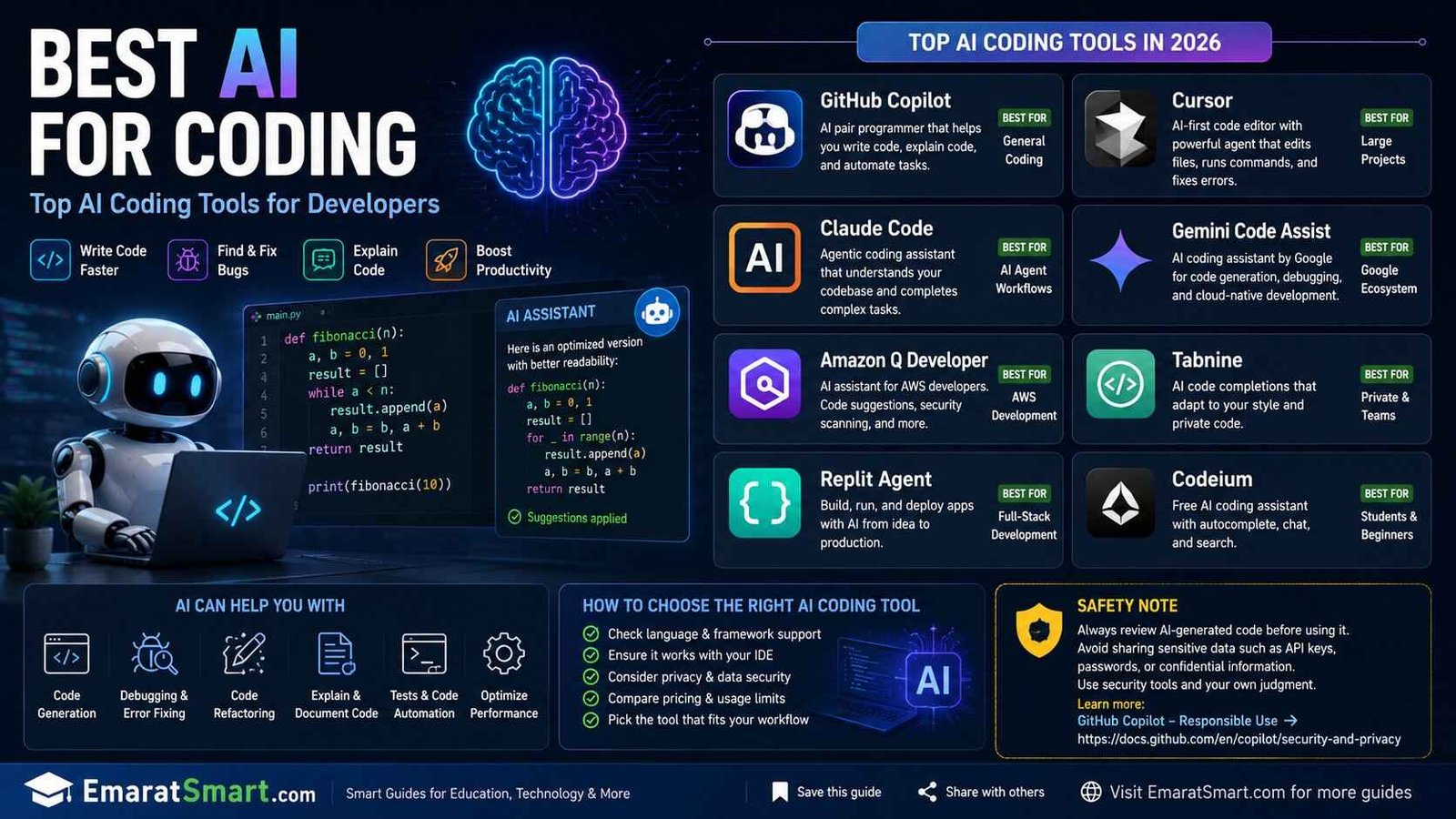
1. GitHub Copilot
GitHub Copilot is one of the most established AI coding assistants and is particularly useful for developers who already use GitHub and popular IDEs.
Copilot can provide code suggestions while you type, answer coding questions, explain code, assist from the command line, and help with larger development tasks.
Its current features also include agent-based workflows. Developers can give Copilot a task and review the changes it makes rather than manually writing every line.
Best for: General programming, GitHub users, students, and developers who want AI inside their existing workflow.
2. Cursor
Cursor takes the idea of an AI coding assistant further by making AI a central part of the coding environment.
Its Agent can search a codebase, edit multiple files, run terminal commands, and help fix errors. It can also work with different AI models, giving developers flexibility when choosing how they want to approach a task.
Cursor is particularly interesting for larger projects where understanding the relationship between different files matters.
Best for: Developers working on larger projects and people who want an AI-first coding environment.
3. Claude Code
Claude Code is designed around agentic software development. Instead of simply suggesting the next line of code, an AI coding agent can work through a larger programming task using the project’s context and available tools.
This approach is useful when a developer wants help investigating a problem, planning changes, editing files, and checking the result.
Best for: Complex coding tasks and developers who prefer an agent-style workflow.
4. Gemini Code Assist
Google’s Gemini-based developer tools can be useful for programmers who work within Google’s development ecosystem.
They can help with programming questions, code generation, explanations, and development tasks. For developers already using Google Cloud services, having AI assistance connected to that ecosystem can be particularly useful.
Best for: Google Cloud developers and programmers already using Google’s developer tools.
5. Amazon Q Developer
Amazon Q Developer documentation is especially relevant for developers working with AWS.
In an IDE, Amazon Q Developer can provide code completions, generate code, explain code, help with debugging and refactoring, and scan code for security vulnerabilities.
This makes it a practical option for developers building applications that rely heavily on AWS services.
Best for: AWS development and cloud-focused programming.
Which AI Is Best for Coding?
The answer depends on the job you want the AI to do.
| Coding Need | Good Choice |
|---|---|
| Everyday coding help | GitHub Copilot |
| AI-first coding environment | Cursor |
| Complex agent-style tasks | Claude Code |
| Google ecosystem | Gemini Code Assist |
| AWS development | Amazon Q Developer |
| Learning programming | AI assistant + your own practice |
| Debugging | Copilot, Cursor, Claude Code, or similar tools |
| Code explanations | Most major AI coding assistants |
This table should not be treated as a permanent ranking. AI coding tools change quickly, and features, models, pricing, and usage limits can change over time.
AI Coding Assistant vs AI Coding Agent
One important difference is the level of independence.
An AI coding assistant generally helps while you remain in control. It may suggest code, answer questions, or explain an error.
An AI coding agent can take a larger goal and work through several steps. For example, you might ask it to add a feature. The agent could inspect the project, identify relevant files, make changes, run tests, and show you what it changed.
Cursor describes its Agent as being able to search the codebase, edit files, run terminal commands, and work through complex coding tasks.
GitHub Copilot has also expanded beyond autocomplete with agent-based features that can research, plan, make changes, and create pull requests for review.
Can AI Write a Complete Website?
Yes, AI coding tools can help create significant parts of a website.
You can ask an AI tool to generate:
- HTML
- CSS
- JavaScript
- React components
- Forms
- Navigation menus
- Landing pages
- API integrations
- Basic tests
However, generating code is only the beginning.
A website still needs testing, accessibility checks, responsive design, security review, performance optimization, and human judgment.
For a beginner, it is better to ask the AI to explain the code as it builds rather than simply copying everything it produces.
Is AI Good for Learning to Code?
AI can be very useful for learning programming when it is used as a tutor rather than a shortcut.
For example, instead of asking:
“Give me the answer.”
try asking:
“Explain why my code does not work and give me a hint before showing the solution.”
This encourages you to understand the problem.
You can also ask an AI assistant to create small exercises, explain programming concepts, review your solution, or provide a simpler example.
The goal should be to become better at programming—not simply to become better at asking AI to write programs.
How to Choose the Best AI for Coding
Before choosing a tool, think about your actual workflow.
Check Your Programming Language
Make sure the tool works well with the languages you use.
Python, JavaScript, TypeScript, Java, C#, C++, PHP, and other popular languages are commonly supported by modern coding assistants, but the quality of suggestions can vary.
Check Your IDE
If you already use VS Code, Visual Studio, JetBrains IDEs, or another editor, check whether your preferred AI tool integrates with it.
GitHub Copilot, for example, supports several major development environments.
Look at Agent Features
If you work on larger projects, agent capabilities may matter more than simple autocomplete.
An agent can potentially understand the wider task, inspect several files, make changes, and help verify the result.
Consider Privacy
Before putting private project information into any AI service, understand its privacy and data-use settings.
This is especially important for businesses, schools, organizations, and developers working with confidential information.
Check Cost and Limits
Many coding tools have free options or limited free usage, while more advanced features may require a paid plan.
For example, GitHub currently offers a Free Copilot tier alongside paid plans, with different usage allowances and features.
Always check the provider’s current pricing page because these limits can change.
How to Use AI Coding Tools Properly
AI works best when you give it useful context.
Instead of saying:
“Fix this code.”
provide information such as:
- What the program should do
- What is currently happening
- The error message
- Which language you are using
- What you have already tried
- Any restrictions or requirements
For larger projects, ask the AI to make a plan first.
Then review the plan before allowing it to make extensive changes.
This approach can reduce unnecessary edits and make it easier to understand what the AI is doing.
Common Mistakes When Using AI for Coding
Copying Code Without Understanding It
A program can appear to work while still containing problems.
Read important sections and make sure you understand what they do.
Trusting AI With Security
Never assume AI-generated code is automatically secure.
Check authentication, permissions, input validation, database queries, dependencies, and other security-sensitive areas carefully.
Giving AI Too Little Context
A vague prompt can produce a vague solution.
Explain the problem clearly and provide the relevant error or code context.
Letting AI Change Everything at Once
For larger projects, smaller changes are easier to review and test.
Ask the AI to work in logical stages when appropriate.
Is AI Going to Replace Programmers?
AI is changing programming, but that does not mean developers suddenly become unnecessary.
Someone still needs to understand the requirements, make technical decisions, check the output, test the software, handle security, and decide whether the solution is actually appropriate.
The role of a programmer may increasingly involve directing, reviewing, testing, and improving AI-generated work.
That makes strong programming fundamentals even more useful.
Frequently Asked Questions
What is the best AI for coding?
There is no single best option for everyone. GitHub Copilot, Cursor, Claude Code, Gemini Code Assist, and Amazon Q Developer each have different strengths. Choose based on your programming language, IDE, project size, preferred workflow, and budget.
What is the best free AI for coding?
Several major coding assistants offer free or limited free access. GitHub Copilot currently has a Free plan with limited features and usage.
Can AI fix coding errors?
Yes. AI coding tools can explain error messages, identify likely causes, suggest fixes, and in some agent-based environments make changes and help verify them.
Can AI write code from scratch?
Yes. AI can generate functions, scripts, webpages, applications, tests, and other programming components. The resulting code should still be reviewed and tested.
Is AI coding good for beginners?
Yes, if it is used for learning rather than simply copying answers. Beginners can use AI to explain errors, teach concepts, create practice questions, and review their code.
Should I use AI for every coding task?
Not necessarily. For simple tasks, writing the code yourself may be faster and better for learning. AI becomes particularly useful for repetitive work, debugging, explanations, documentation, and larger development tasks.
Is AI-generated code safe?
Not automatically. AI can produce bugs, insecure patterns, outdated approaches, or code that does not match your project’s requirements. Always review and test important code.
Conclusion
The best AI for coding depends on what you are building and how you like to work.
GitHub Copilot is a strong general-purpose choice, while Cursor is attractive for developers who want an AI-first coding environment. Claude Code and other agent-based tools are useful for larger tasks, while Gemini Code Assist and Amazon Q Developer can make sense for developers working within Google’s or AWS’s ecosystems.
The most important point is simple: use AI to improve your programming, not replace your understanding of programming.
When you combine AI assistance with good coding fundamentals, testing, security practices, and regular practice, these tools can become a useful part of the development workflow.