
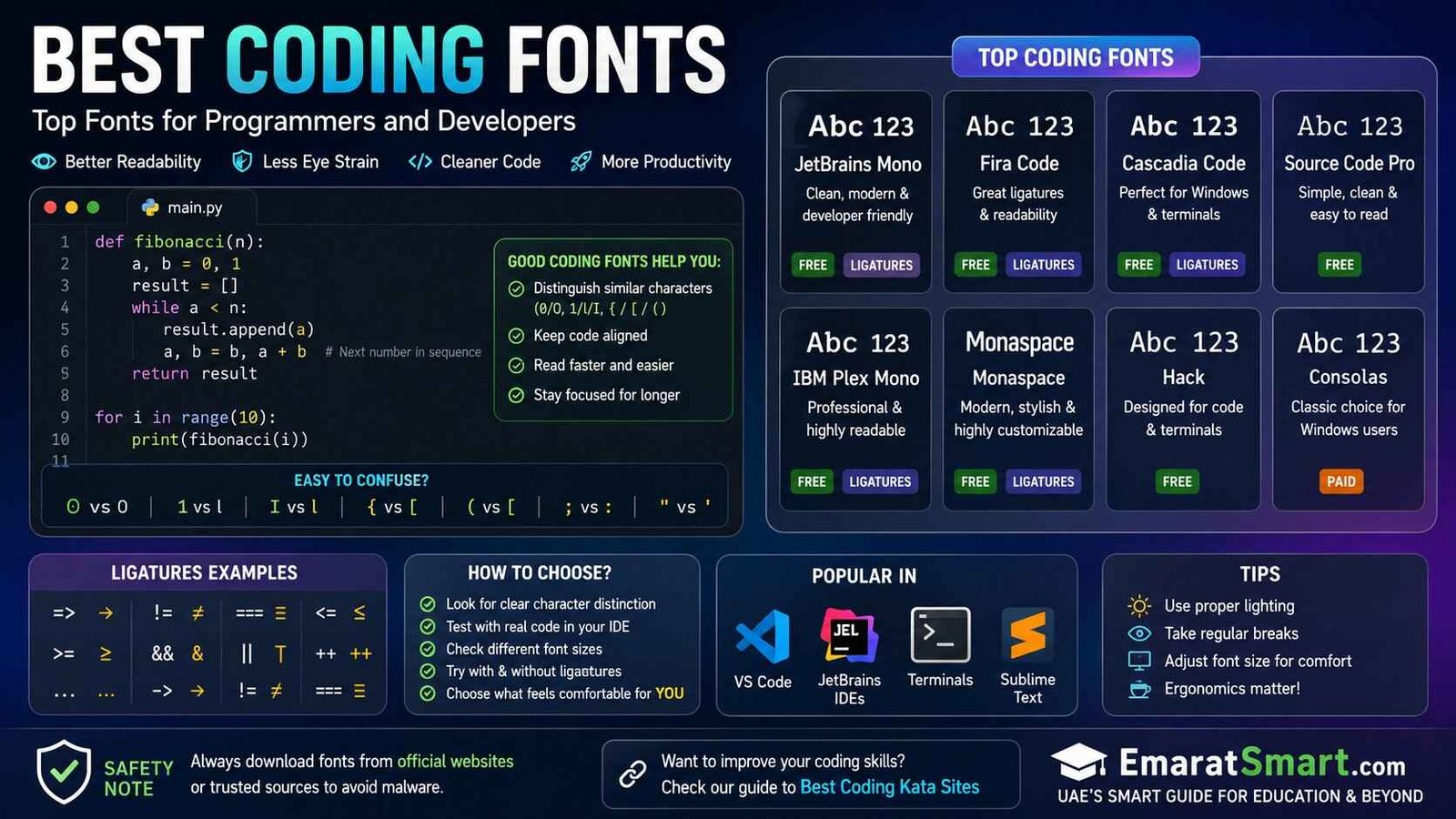
Best Coding Fonts: Top Fonts for Programmers and Developers
The font you use while coding might seem like a small detail, but if you spend hours looking at code, it can make a noticeable difference. A good coding font makes characters easier to distinguish, keeps code neatly aligned, and helps your editor feel more comfortable to use.
Unlike regular fonts, coding fonts are usually monospace fonts, meaning each character takes up the same amount of horizontal space. This makes code easier to scan because symbols, indentation, and lines stay visually organized.
There is no single font that every programmer will love. Some developers prefer clean and simple lettering, while others like programming ligatures that visually combine characters such as => or !=.
Safety Note: When downloading coding fonts, use the font developer’s official website or a trusted source. Avoid unknown font-download websites that may bundle unwanted software. For guidance on using and specifying fonts safely in CSS, see MDN Web Docs – CSS font-family.
If you are also looking for ways to improve your programming practice, check our guide to the best coding kata sites.
What Makes a Good Coding Font?
A coding font should do one important job well: make code easy to read.
Before choosing a font, look closely at characters that are commonly confused, such as:
0andO1,l, andI{and([and(;and:"and'
A good programming font gives these characters enough visual distinction that you do not have to stop and figure out what you are looking at.
Another useful feature is consistent spacing. Monospace fonts give every character the same width, which is why they are commonly used for programming and code examples.
Best Coding Fonts at a Glance
| Coding Font | Best For | Free? | Ligatures |
|---|---|---|---|
| JetBrains Mono | Overall coding | Yes | Yes |
| Fira Code | Ligatures | Yes | Yes |
| Cascadia Code | Windows developers | Yes | Yes |
| Source Code Pro | Clean, simple code | Yes | No |
| IBM Plex Mono | Professional interfaces | Yes | Optional/varies |
| Monaspace | Modern development | Yes | Yes |
| Hack | Terminal and coding | Yes | No |
| Consolas | Windows users | No | No |
The best choice depends on your editor, operating system, screen size, and personal preference.
1. JetBrains Mono
JetBrains Mono is one of the easiest fonts to recommend if you simply want a comfortable programming font without spending a lot of time experimenting.
It was designed specifically for developers, with letter shapes intended to remain readable when working with code. It also includes programming ligatures.
The font works particularly well in modern development environments and is a natural choice for people who use JetBrains IDEs.
Why choose JetBrains Mono?
- Designed for developers
- Clear letter shapes
- Good readability
- Multiple weights
- Supports programming ligatures
- Free and open source
If you want one font to try first, JetBrains Mono is a strong starting point.
2. Fira Code
Fira Code is probably one of the most recognizable programming fonts among developers who enjoy ligatures.
Its main attraction is the way it displays common programming symbols. Sequences of characters can be visually combined into programming ligatures while the actual code remains unchanged.
For example, combinations involving arrows, comparison operators, and assignment symbols can appear more connected.
This can make certain languages feel cleaner, especially when your code contains lots of operators.
Why choose Fira Code?
- Free
- Open source
- Excellent ligature support
- Works with many popular editors
- Clean appearance
- Popular among web developers
If you like the idea of programming ligatures, Fira Code is worth trying.
3. Cascadia Code
Cascadia Code is a particularly good option for developers who spend a lot of time working in the Windows ecosystem.
It was created by Microsoft and is designed for programming and command-line environments.
There is also Cascadia Mono, which provides the same general family without the programming ligatures.
Why choose Cascadia Code?
- Designed for coding
- Excellent option for Windows users
- Includes ligature support
- Works well in terminals
- Modern appearance
- Free
If you use Windows Terminal regularly, Cascadia Code is an especially natural choice.
4. Source Code Pro
If you do not care about fancy programming ligatures and simply want a clean coding font, Source Code Pro is worth considering.
It has a straightforward appearance that works well for programming, documentation, and code screenshots.
One advantage of a simpler font is that the code looks very close to what you actually type. Some programmers prefer that because there are fewer visual transformations happening on screen.
Why choose Source Code Pro?
- Clean design
- Easy to read
- Good character distinction
- Suitable for long coding sessions
- Free
- Works well in many editors
It is a good choice for developers who want clarity over decoration.
5. IBM Plex Mono
IBM Plex Mono brings a slightly more distinctive personality to the programming workspace while remaining practical for code.
It is part of the wider IBM Plex family and works nicely when you want your editor and documentation to have a consistent visual identity.
Why choose IBM Plex Mono?
- Professional appearance
- Good readability
- Open-source font family
- Useful for code and technical documentation
- Works well at different sizes
It is a good middle ground if you want something more distinctive than a basic monospace font.
6. Monaspace
Monaspace is a newer generation of developer-focused typeface family associated with GitHub’s work on typography for code.
One interesting feature is that it is designed as a family of related typefaces rather than simply one conventional monospace face.
It gives developers more flexibility when choosing the visual character of their coding environment.
Why choose Monaspace?
- Modern design
- Created with coding in mind
- Open source
- Multiple related styles
- Useful for developers who want something different
If you have already tried the usual coding fonts and want something more modern, Monaspace is worth exploring.
7. Hack
Hack is another practical choice for programming and terminal work.
Its design puts considerable emphasis on making characters distinguishable, which is useful when you are dealing with long lines of code or command-line output.
It is less flashy than some newer programming fonts, but that can actually be an advantage.
Why choose Hack?
- Designed for source code
- Clear characters
- Good terminal option
- Free
- Simple appearance
If you prefer a font that stays out of the way and lets you focus on your code, Hack is worth a look.
8. Consolas
Consolas has been a familiar choice for Windows developers for many years.
It was designed for programming and is widely associated with Microsoft’s Windows development environment.
It does not have the modern open-source appeal of some newer choices, but it remains a useful option, particularly if you already have it available on your system.
Why choose Consolas?
- Familiar to Windows developers
- Designed for programming
- Clear appearance
- Works well in many coding environments
- Good option for users who prefer traditional fonts
Sometimes the best coding font is simply the one that already feels comfortable to you.
Coding Fonts With Ligatures vs Without Ligatures
One of the biggest choices you will make is whether you actually want programming ligatures.
Ligatures can visually combine certain sequences of characters into a single-looking symbol.
For example, an editor may display a sequence such as => as a connected arrow.
The underlying code has not changed. The font is simply changing how the characters are displayed.
Advantages of Ligatures
They can:
- Make some operators easier to recognize
- Reduce visual clutter
- Give code a more polished appearance
- Make certain programming symbols easier to scan
Disadvantages of Ligatures
Not everyone likes them.
Some developers find that ligatures:
- Make code look unfamiliar
- Hide the individual characters
- Take time to get used to
- Can be distracting during code review
There is no right or wrong answer.
Try them for a few days and see whether they actually help you.
What Is the Best Coding Font for Beginners?
If you are new to programming, do not spend too much time worrying about fonts.
Your first priority should be learning how code works.
However, a few beginner-friendly options are:
JetBrains Mono: A good all-round choice.
Fira Code: Great if you like ligatures.
Cascadia Code: Excellent for Windows users.
Source Code Pro: Good if you prefer a straightforward appearance.
The most important thing is that you can easily distinguish similar characters.
Best Coding Font for VS Code
Visual Studio Code supports custom editor fonts, so you have plenty of choices.
Popular options include:
- JetBrains Mono
- Fira Code
- Cascadia Code
- Source Code Pro
- IBM Plex Mono
- Monaspace
You can change the editor font in VS Code settings by adjusting the editor font-family setting.
For example:
font-family: "JetBrains Mono", monospace;The exact configuration depends on the application you are using.
Best Coding Font for Windows
Windows users have several good choices.
Cascadia Code is an obvious option because it was designed by Microsoft for modern development and terminal environments.
Consolas is another familiar choice.
You can also install fonts such as JetBrains Mono, Fira Code, Source Code Pro, or Hack if you prefer their appearance.
Best Coding Font for Mac
Mac users are not limited to Apple’s default developer fonts.
You can install and use many popular programming fonts, including:
- JetBrains Mono
- Fira Code
- Source Code Pro
- IBM Plex Mono
- Hack
- Monaspace
The best option is the one that remains comfortable at your preferred editor size.
Best Coding Font for Terminal Use
Terminal work has slightly different requirements from normal code editing.
You want characters to remain clear even when the text is small.
Good options include:
- JetBrains Mono
- Cascadia Mono
- Hack
- Source Code Pro
- DejaVu Sans Mono
A terminal font should also work well with the symbols and characters you commonly encounter in command-line output.
How to Choose the Right Coding Font
Instead of choosing a font simply because it looks good in a screenshot, test it with your own code.
Open a project and check:
Character clarity: Can you quickly distinguish 0, O, 1, I, and l?
Punctuation: Are braces, brackets, commas, periods, and semicolons easy to see?
Size: Is the text comfortable without making your editor feel crowded?
Spacing: Does the code look organized?
Comments: Can you comfortably read comments as well as actual code?
Ligatures: Do they help you or distract you?
This simple test is more useful than choosing a font based purely on popularity.
What Font Size Should You Use for Coding?
There is no universal perfect font size.
Your screen resolution, viewing distance, eyesight, editor layout, and personal preference all matter.
A common mistake is choosing a very small font simply because it allows more code to fit on the screen.
More code on the screen is not necessarily better if you have to concentrate harder to read it.
Start with a comfortable size and adjust it until your code is easy to read.
Should You Use a Monospace Font for Coding?
Generally, yes.
Monospace fonts give characters equal widths, which helps maintain alignment in source code and makes code blocks easier to scan. CSS also provides the generic monospace family as a fallback option.
When specifying a font in CSS, it is a good idea to include a fallback:
font-family: "JetBrains Mono", monospace;If the preferred font is unavailable, the browser can fall back to another monospace font. MDN recommends including a generic family in the font-family list for this reason.
Coding Font vs Normal Font
A normal proportional font gives different characters different widths.
For example, an i may be much narrower than an m.
A monospace coding font gives each character the same horizontal width.
That makes programming text more predictable and helps keep code visually aligned.
This is why fonts such as Fira Code, JetBrains Mono, Consolas, and other monospace families are commonly used by developers.
Do Coding Fonts Improve Programming?
A font will not make someone a better programmer.
What it can do is make the programming environment easier to work with.
If a font makes confusing characters easier to distinguish and code easier to scan, it can reduce unnecessary visual friction.
The effect is personal, though. One developer may find ligatures helpful while another may immediately turn them off.
The goal is not to find the most fashionable font. The goal is to find the font that lets you read your code comfortably.
Common Mistakes When Choosing a Coding Font
Choosing Appearance Over Readability
A font can look fantastic in a screenshot but become tiring after several hours.
Always test it with real code.
Making the Font Too Small
Trying to fit more code on the screen can make reading unnecessarily difficult.
Assuming Ligatures Are Better
Ligatures are a preference, not a requirement.
Ignoring Character Differences
Always test confusing characters such as 0/O and 1/I/l.
Downloading From Random Websites
Stick to official font projects and trusted sources rather than unknown download pages.
Frequently Asked Questions
What is the best coding font overall?
JetBrains Mono is a strong all-round choice because it was designed for developers and offers clear characters, multiple weights, and programming ligatures.
Is Fira Code good for programming?
Yes. Fira Code is particularly useful for developers who like programming ligatures and want a free coding font.
Is JetBrains Mono free?
Yes, JetBrains Mono is available as a free and open-source typeface.
Is Cascadia Code good for Windows?
Yes. Cascadia Code is a strong option for Windows development and terminal use.
Are coding fonts better than normal fonts?
For source code, monospace fonts are generally more suitable because each character occupies the same width. However, personal preference still matters.
Should I use coding ligatures?
Try them and decide based on your own experience. Some programmers like them, while others prefer to see every individual character clearly.
What is the best font for VS Code?
JetBrains Mono, Fira Code, Cascadia Code, and Source Code Pro are all good options to test in VS Code.
What is the best font for terminal coding?
JetBrains Mono, Cascadia Mono, Hack, and Source Code Pro are useful options for terminal environments.
Final Recommendation
If you want a simple starting point, try JetBrains Mono first.
If you love programming ligatures, give Fira Code a try.
If you use Windows heavily, Cascadia Code is an excellent option.
If you prefer a clean design without visual tricks, Source Code Pro is worth testing.
And if you want something newer and different, explore Monaspace.
The important thing is not which font wins an internet ranking. It is whether the font makes your own code easier and more comfortable to read.
Try two or three options with a real project, keep the one that feels natural, and change it later if your preferences change.
For more practical technology and education guides, keep reading EmaratSmart.com.